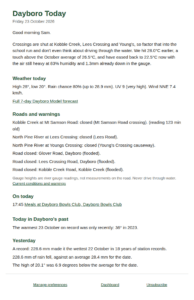

Put the Dayboro weather on your TV, your tablet, or your phone
The station on the hill, live on a screen you already own. It updates itself every minute, goes dark after sunset, and shows Bureau warnings the moment they land. Free.
I have been running the station up here on Lyndhurst Hill sicne April 2004, and the way you looked at the data was always a web page you had to go and open. Weather isn't like that. You glance at it, the same way you glance at a clock. So I built a screen for glancing at. Open it once, leave it running, done.
What you get on the screen
Live conditions
Temperature, rain, wind, pressure, humidity and UV, fresh every minute. Each one sits next to what is normal for this exact day of the year, so 31 degrees against a normal of 26 tells you straight away the day is running hot.
Warnings that find you
A red banner across the top within 2 minutes of the Bureau issuing a warning for our area. The storm card lights up when the lightning network places strikes nearby, and I have watched it put strikes over the Mt Mee side with the rain still 20 minutes from my gauge. No news, no app, the screen on the wall tells you. For storm season alone I reckon that earns it the spot.
Forecast and what is on
Two tickers along the bottom. The Dayboro Model forecast on one, local events and markets on the other. Click a forecast day for the full forecast, click an event to land on the event.
Day and night
Full color in daylight, dark and quiet after sunset, switched on the real Dayboro sun times. It won't blind you from the corner of the lounge room at 9 pm.
Get it on your screen in three steps
-
1
Open weather.dayboro.au
On your phone, tablet, laptop or TV browser. That's the whole address, nothing to download from a store.
-
2
Tap Menu, then Add to Screen
On an iPhone or iPad it is the Share button in Safari, then Add to Home Screen. Either way you get an icon that opens full screen with no browser bars.
-
3
Leave it running
You never refresh it. The data refreshes every 60 seconds, the forecast and events update themselves through the day, and when I improve the display your screen picks the new version up on its next load.
Which screen have you got?
Chrome, then Menu, then Add to Screen. The best all round option.
Safari, then Share, then Add to Home Screen.
Chrome or Edge installs it as its own window. Handy for a spare monitor in the shed or office.
Android and Google TVs install it like a phone. Samsung and LG mostly cannot install web apps, so open the browser, go to the address and bookmark it. An old tablet on a wall mount beats most smart TVs here. Mine is a 2019 Samsung tab that was headed for the drawer.
Ambient mode, for a wall
The dashboard shows everything at once. Sometimes that is more then you want in a lounge room. Ambient mode rotates through four big scenes, 15 seconds each: right now, rain, wind and pressure, and the next three forecast periods. The clock stays in the corner, the cursor hides itself after 5 seconds, the screen asks the device to stay awake, and warnings still punch through on top of whatever scene is up, because a pretty screen that hides a severe storm warning, which is the one thing you actually bought the screen for, would be a stupid screen. At first I wanted six scenes. No, four. Six looked like homework.
Free or member
Free, for everyone
- Live conditions with the day of year normals
- Bureau warnings, storm and flood status
- Air quality
- Ambient mode
- Events ticker
- First 3 days of the forecast
Weather service members
- Everything in free
- The full forecast set on the ticker
- On the main site: the 30 day forecast, the long range outlooks and the seasonal work
- The accuracy reporting, where I show you exactly where the forecasts were right and where they were not
Got a shop window?
The display can carry your content. Your logo, your listings, your specials or your opening hours, cycling inside the live weather. A real estate office running open houses in the front window. A cafe with the day's specials. A rural store with the spray windows. One off setup, then a subscription that keeps the screen alive. Tell me what you'd want cycling on it and I'll tell you what it costs.
The fine print, honestly
TV browsers are a mixed bag. Some are great, some are barely browsers, and on the worst of them the bookmark route is as good as it gets. The lightning layer is detection, not prophecy. It tells you what is happening, not what will happen in an hour. And on this moment the display is young. It went live this week, and a news ticker and the business directory are still to come. If something looks off on your screen, tell me what device it is and I will chase it.
See you at weather.dayboro.au. Leave it running, that is the whole point.
Get Dayboro weather delivered to your inbox every morning: forecasts, garden tips, and local updates. Subscribe free →