Why I Built This
If you've lived in Dayboro for more than one storm season, you know the drill. You're outside doing something useful, mowing, feeding chooks, pretending to fix something in the shed, and then the sky goes that particular shade of grey-green. You pull out your phone, check the Bureau radar on one tab, check lightning on another tab, try to figure out if that cell is heading your way or going to miss you by 10km... and by the time you've worked it out, you're already soaked.
I got sick of juggling multiple sites. So I built one page that shows you everything in one spot. Rain radar, lightning strikes, storm tracking, all on teh same map, all updating automatically. No faffing about.
You can find it at dayboro.au/radar/. Bookmark it. You'll use it more than you think.
What You're Looking At
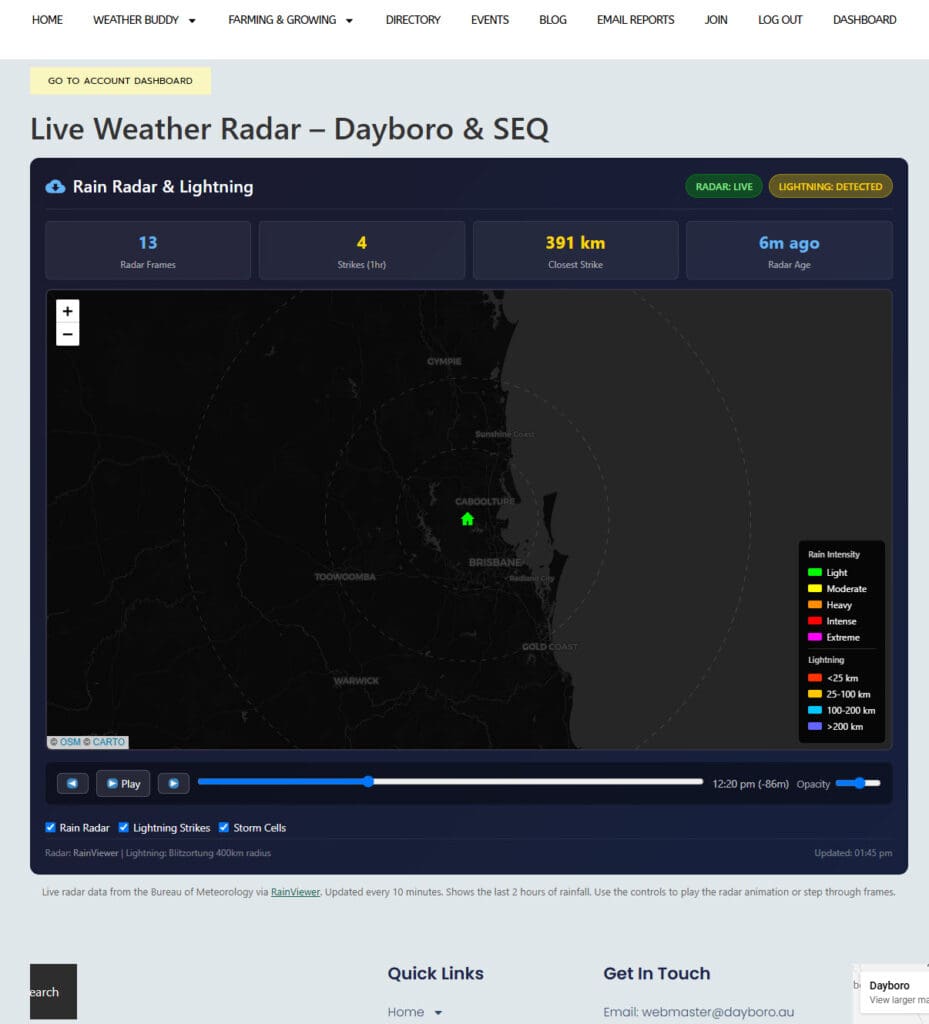
It's a dark-themed map centred right on Dayboro with range rings at 50km, 100km, and 200km so you can judge distances at a glance. The radar overlay shows the last two hours of rainfall animation, you can watch storms roll in from the west in real time, which is honestly a bit mesmerising during a decent system.
But here's where it gets properly useful. On top of the rain radar, you also get:
- Real-time lightning strikes, colour-coded by distance. Red means close (under 25km, time to get inside). Yellow is 25-100km, blue is 100-200km, and purple is the far-off stuff you don't need to worry about yet.
- Storm cell tracking, detected cells show up with directional arrows. If the arrow is red, that cell is heading towards Dayboro. Pay attention to those ones.
- Short-range nowcast, the animation doesn't just show you what happened, it also projects where the rain is likely heading in the next little while.
- A flashing alert banner, when lightning is detected within 50km of Dayboro, you'll see a warning at the top of the page. Hard to miss.
At the top there's a stats bar showing you the numbers: how many radar frames are loaded, lightning strikes in the last hour, the closest strike distance, and how fresh the radar data is. If the radar says "3 minutes ago" you know you're looking at current stuff. If it says "47 minutes ago" then something's gone wrong with the Bureau feed (happens sometimes, she'll be right).
How to Use the Controls
It's not complicated, I built it for people who want weather info, not people who want to learn a new app.
- Play/Pause button, starts and stops the radar animation loop. Watch the rain move across the map.
- Step forward/back, jump through radar frames one at a time if you want to look at a specific moment.
- Timeline scrubber, drag it to jump to any point in the last two hours.
- Layer toggles, show or hide the Rain Radar, Lightning Strikes, or Storm Cells independently. Sometimes you just want to see lightning without the radar clutter, or vice versa.
- Opacity slider, dial the radar overlay up or down so you can still see the base map underneath.
Status badges at the top tell you if the radar feed is live and whether lightning has been detected. Green means live data, red means something's not right.
When It's Most Useful
Honestly? Late afternoon in storm season. October through March, when those big cells build up over the D'Aguilar Range and come barrelling down the valley. That's when you want this page open. You can see the cell forming, watch it move, check if lightning is ramping up, and make a sensible call about whether to bring the washing in or keep watching it from the verandah with a beer.
It's also handy for general rain tracking, like when you can hear thunder in the distance and want to know if it's actually coming your way or heading up towards Kilcoy instead.
Where the Data Comes From
I believe in giving credit where it's due. The rain radar data comes from RainViewer, which pulls from the Bureau of Meteorology's radar network. It's free and surprisingly reliable. The lightning data comes from Blitzortung, which is a citizen science network, volunteers around the world run lightning detection receivers that triangulate strike locations in real time. Brilliant project, and the data is very good.
The radar refreshes every 5 minutes and lightning updates every 2 minutes. So you're never looking at anything too stale.
What About the Old Radar Page?
Some of you might remember we had a radar-only page before. This replaces it. Same URL at dayboro.au/radar/, but now with lightning and storm tracking bolted on. It's just better in every way, no reason to keep teh old one around.
If you're specifically interested in lightning statistics and historical data, we've still got the dedicated Lightning Dashboard page as well, that one goes deeper into strike counts, distance trends, and thier history. The radar page is more about "what's happening right now", while the Lightning Dashboard is more about "what happened today and this week".
Give It a Go
Next time the sky looks dodgy, pull up dayboro.au/radar/ and see for yourself. It works on your phone too, so you can check it from the shed... or the verandah... or wherever you happen to be when the thunder starts rumbling.
If something looks broken or you've got ideas for improvements, drop me a line. This is a community weather site, your feedback actually matters.
Stay dry out there. Or don't. It's Queensland, sometimes you just have to accept getting wet.
Get Dayboro weather delivered to your inbox every morning: forecasts, garden tips, and local updates. Subscribe free →